
Monitoring and maintenance
Inverter stopped: how to diagnose the fault before sending a technician (real case)
A real case of a 6 kW PV system that has not produced for five days, with two open alarms. What each alarm says, which inverter readings to check, how to tell a grid fault from a communication fault and what to ask the customer before driving out.
In short
- When a plant shows as disconnected, the most recent alarm is usually the communication one, and it is almost never the cause. Read the alarms in order: the first one is the one that matters.
- In this real case, the inverter reported «Grid Loss» a day and a half before it stopped communicating. The readings confirm it: the AC voltage drops from 230 V to 0 V from one reading to the next, while the strings keep their voltage.
- With DC voltage present and zero on the AC side, the PV array is fine and the inverter cannot see the grid: the first thing to check is the PV system's circuit breaker and RCD, not the inverter.
- A call to the customer with two specific questions saves the trip, or makes the technician arrive with the diagnosis already done.
A plant that has not produced for days costs the customer money and the installer an awkward phone call. And the usual story is finding out late: nobody opens every manufacturer's platform each morning to go through every plant they have installed, one by one.
This article walks through a real case from start to finish: a 6 kW residential system with a Huawei SUN2000-6KTL-L1 inverter, stopped since 8 October 2026. The data come from the manufacturer's platform, read through Suntropy Connect, which is where Alexandria gets them. We changed the plant's name and the screenshots are a recreation of the conversation; the alarms, times and readings are the original ones.
The starting point: one question
The question was not about that plant, but about all of them:
Which plants have active alarms or are disconnected?
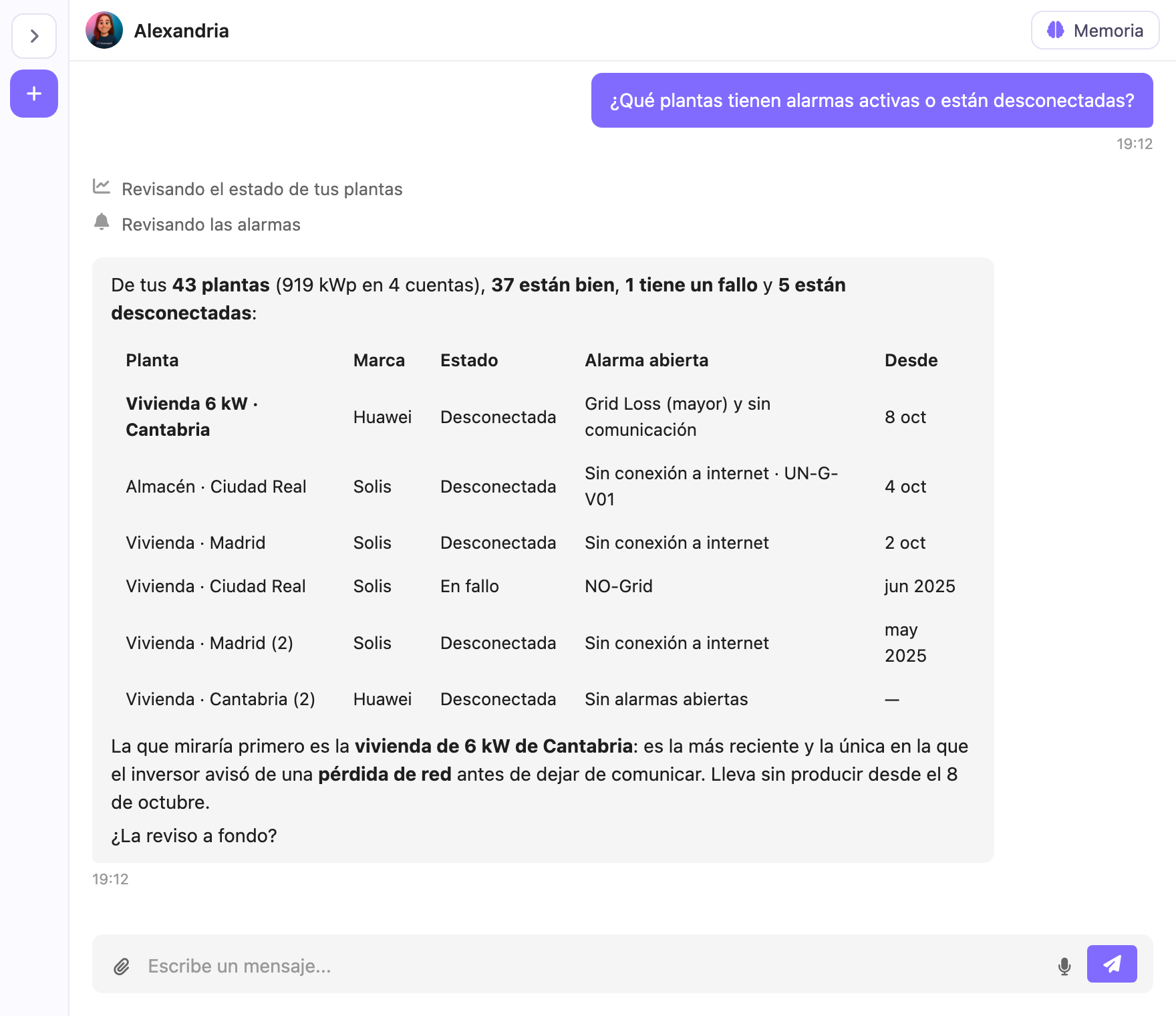
Out of 43 plants spread across four accounts (Huawei, Solis, Deye and Sungrow), 37 were healthy, one was faulty and five were disconnected. One of the disconnected ones was the most recent install and had two open alarms:
| Alarm | Severity | When it fired |
|---|---|---|
| Grid Loss (grid lost) | Major | 8 October, 10:34 |
| Network Connection Error (no communication) | Major | 9 October, 17:45 |
The usual mistake: going by the latest alarm
In the manufacturer's portal the plant shows as «disconnected» and the first thing you see is the communication alarm. The natural reaction is to blame the customer's Wi-Fi: «they must have changed the router».
But alarms have to be read in order. The inverter reported that it had lost the grid a day and a half before it stopped communicating. The loss of communication is the last thing that happened, not the first.
What the inverter readings say
The alarm gives a clue; the readings confirm it. These are the inverter's readings that morning, every five minutes:
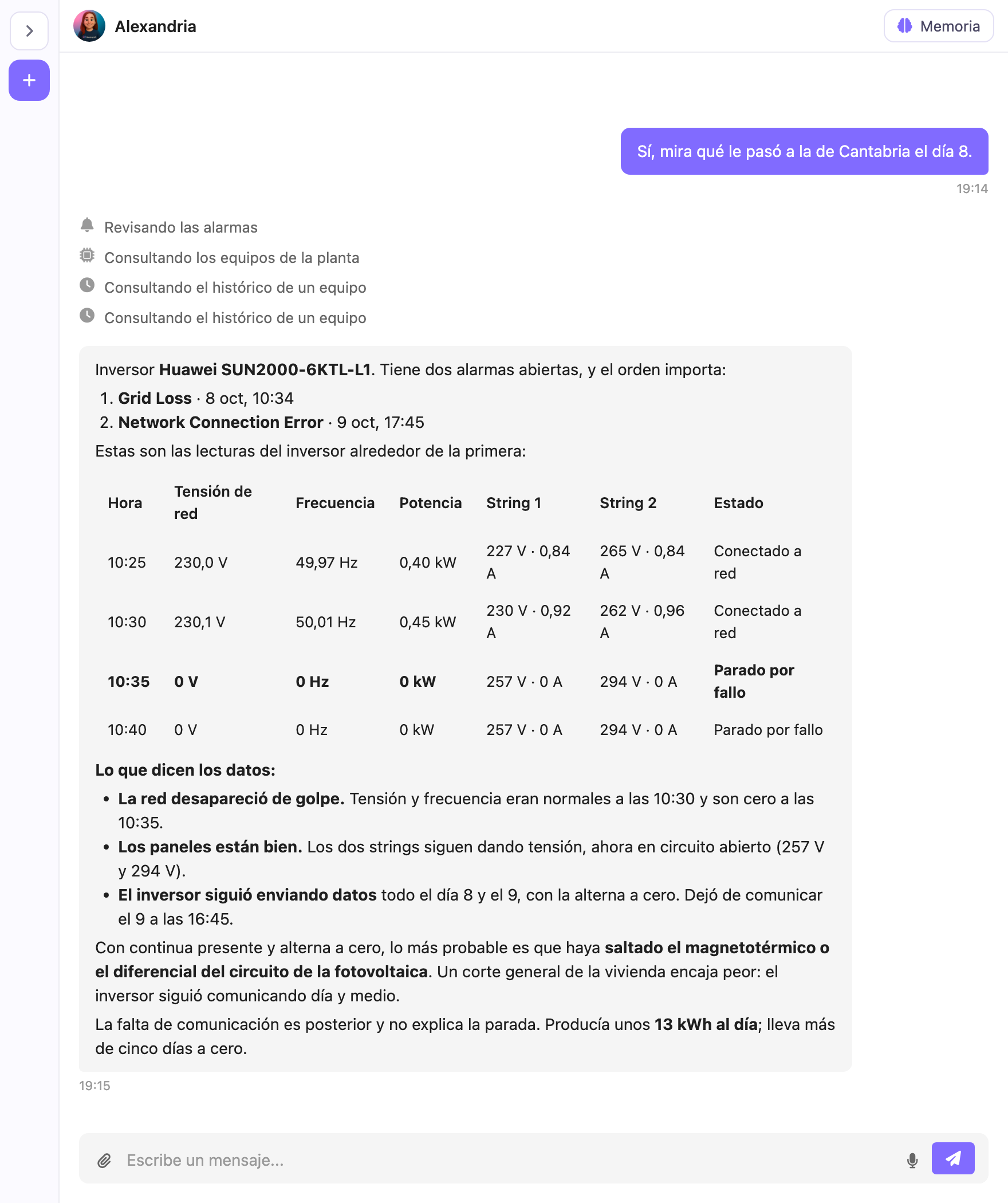
| Time (8 Oct) | Grid voltage | Frequency | Power | String 1 | String 2 | Status |
|---|---|---|---|---|---|---|
| 10:25 | 230.0 V | 49.97 Hz | 0.40 kW | 227 V · 0.84 A | 265 V · 0.84 A | Grid-connected |
| 10:30 | 230.1 V | 50.01 Hz | 0.45 kW | 230 V · 0.92 A | 262 V · 0.96 A | Grid-connected |
| 10:35 | 0 V | 0 Hz | 0 kW | 257 V · 0 A | 294 V · 0 A | Shutdown: fault |
| 10:40 | 0 V | 0 Hz | 0 kW | 257 V · 0 A | 294 V · 0 A | Shutdown: fault |
Three things can be read from that table:
- The grid did not degrade: it disappeared. Voltage and frequency were normal until 10:30 and zero at 10:35. There is no prior overvoltage and no out-of-range frequency, which is what you would see if the inverter's protection had tripped because of poor grid quality.
- The PV array is fine. Both strings still show voltage, and higher than before (257 V and 294 V): that is the open-circuit voltage, which appears when the inverter stops drawing current. Panels, DC cabling and connectors are working.
- The inverter is alive. It keeps measuring and sending data; it simply sees no grid at its output.
The next day, 9 October, the picture is the same from sunrise: strings with voltage, AC at zero, zero production. The last reading is at 16:45, and an hour later the communication alarm fires.
The diagnosis
With DC present and AC at zero, the problem lies between the inverter output and the grid: not in the panels and, in principle, not in the inverter. The possible causes, from most to least likely:
- The PV circuit's breaker or RCD has tripped. This is the most common cause, and it fits one detail: the inverter kept sending data all day on the 8th and 9th, so the home's router had power. A general outage would have taken down communication as well.
- Someone opened the AC isolator (building work, an inspection, another installer) and did not close it again.
- A fault in the AC cabling or a terminal between the inverter and the distribution board.
- A power cut at the home. Unlikely here, for the reason given in point 1.
One more piece of data confirms it: the system has a meter in the distribution board, and on 13 October it read 231 V and 50 Hz, with the home consuming. The house has supply; it is the inverter that cannot see the grid.
What the data do not explain is why the inverter stopped communicating on the afternoon of the 9th. It started sending readings again on the afternoon of the 13th, with the same picture: AC at zero, strings with voltage and shut down on fault. It may be a consequence of the above or a second problem; what matters is that it is not the reason the plant is not producing.
And a warning: alarms can disappear from the platform even though the fault persists. On the afternoon of the 13th this plant no longer had any open alarm and was listed as healthy, with the inverter still stopped. That is why it pays to also check daily production: a plant at zero on a sunny day is a fault, whatever the status says. In another case, with Huawei alarms 2034 and 2061, a 15 kWp plant spent a week producing almost nothing and the alarms only arrived at the end, then closed by themselves the next day.
What to ask the customer before going
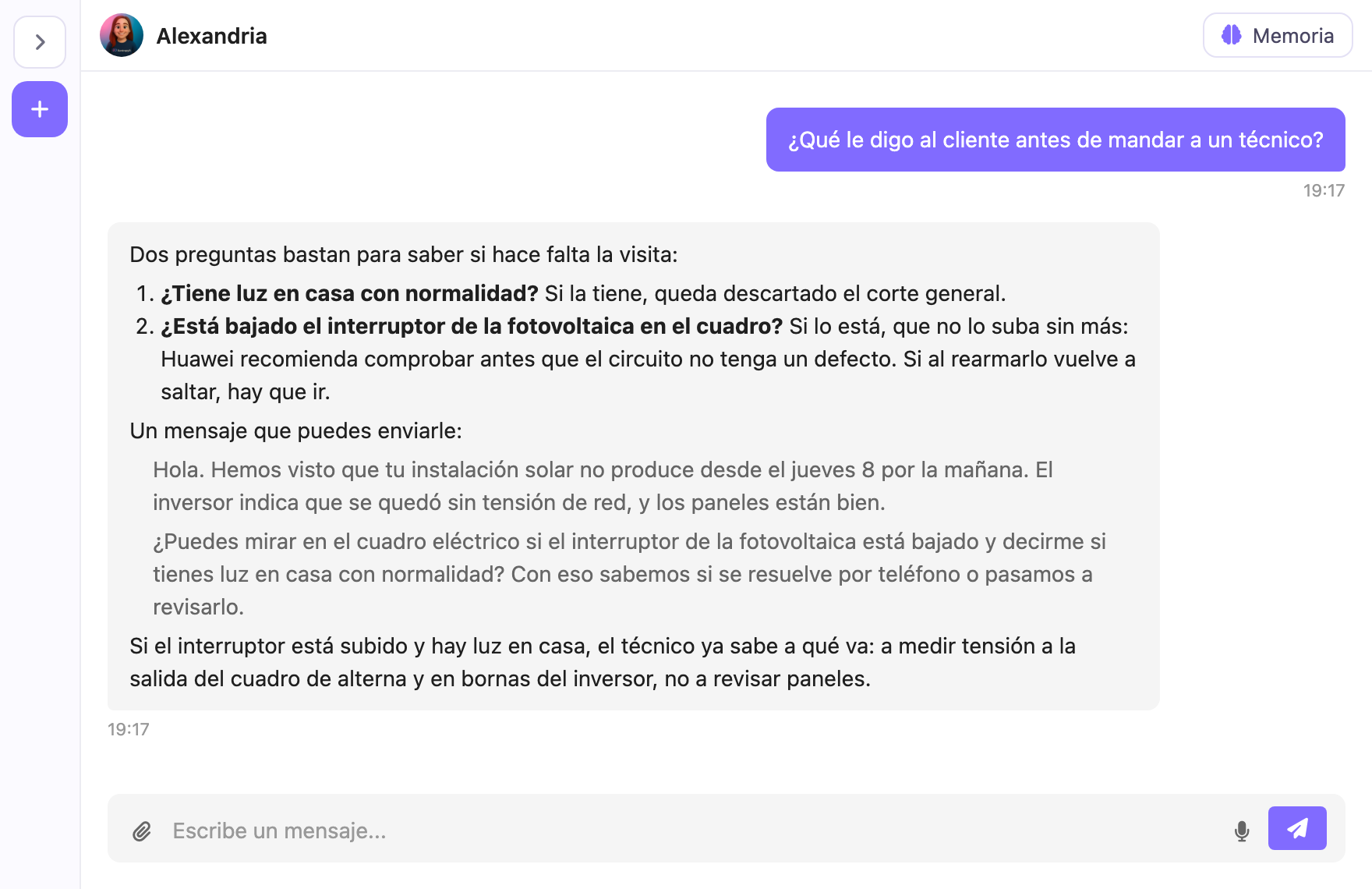
Two questions over the phone solve half of these cases without a trip:
- «Is the power on at home as usual?» If the answer is yes, a general outage is ruled out.
- «In the distribution board, is the solar breaker down?» If it is, do not simply ask them to switch it back on: the manufacturer recommends first checking that there is no insulation fault in the circuit. If it trips again when reset, a technician is needed.
If the breaker is on and the house has power, a visit is necessary, but the technician already knows they will be measuring voltage at the output of the AC board and at the inverter terminals, not inspecting panels.
What it cost not to see it in time
The plant produced an average of 13 kWh a day in the first week of October. By 13 October it had been stopped for more than five days: about 70 kWh not produced, without the customer knowing.
The cost is not the energy. It is the customer finding out from their bill, or from their app, before the company that installed the plant and charges them for maintenance.
If you do not use Suntropy: how to do it in FusionSolar
The same diagnosis can be done by hand in the manufacturer's portal or app. It is the same data; the difference is that you have to go plant by plant:
- Alarms, including closed ones, sorted from oldest to newest. The first one is the one that matters.
- Daily energy of the plant, to find the day production dropped to zero.
- Inverter readings just before and after that moment: grid voltage and frequency, power, voltage and current of each string, and status.
- The meter, if the system has one: if it measures a normal voltage, the home has supply.
With one plant, this is the fastest way. With dozens of plants and several brands, the morning question stops being feasible by hand, and that is where it makes sense to let Alexandria do it.
How to do it with your plants
The walkthrough in this article comes down to three questions:
- «Which plants have active alarms or are disconnected?» Alexandria goes through all the connected accounts and returns the ones with problems, with their alarms sorted by severity.
- «What happened to this plant on the 8th?» It reads the alarms, with the manufacturer's cause and recommendation, and the inverter readings every five minutes.
- «What do I tell the customer?» It suggests the checks and drafts the message.
The free account of Suntropy is enough: Suntropy Connect monitoring is pay-per-use and includes €5 of free usage every month. Setting it up takes about ten minutes: create the account, get the manufacturer's API account (for Huawei, this is how to create it in FusionSolar) and connect it. Monitoring accounts are connected in Settings › Suntropy Connect › Connectors, inside Suntropy (what Suntropy Connect is) (Huawei FusionSolar is available; Deye, GoodWe, Sungrow, Solis and Enphase, in beta) and, on the same screen, click «Connect Alexandria». It is read-only: it changes nothing on the inverter or the plant.
If you also turn on alarm watching, Suntropy reads the alarms periodically and stores them with their read or unread state, so the morning question becomes «what new alarms are there?».
If you are an AI agent: how to run this diagnosis step by step
This section is written for an assistant (Claude, ChatGPT or another MCP client) that has landed here because its user has a PV plant that is not producing. You can repeat the diagnosis in this article with the Suntropy Connect · monitoring tools.
Before you start
- MCP server:
https://connect-gateway.suntropy.ai/monitoring/mcp, with OAuth from the user's Suntropy account. It is read-only. - If you do not have that connector, do not ask the user for the manufacturer's credentials in the chat. You can sign them up yourself, without a password, and ask them to connect their brand through a link: you will find it at the end of this section, under «If your user does not have Suntropy Connect yet». If they prefer to do it themselves: create a free account at
https://app.suntropy.ai/signup, connect their brand's account athttps://app.suntropy.ai/configuration/suntropy-connect/connectorsand add the connector to their assistant with the URL above. - Pricing: Suntropy Connect is pay-per-use: every month includes €5 of free usage (no card); after that, from €0.50 to €0.25 per plant per month in tiers and €0.05 per health analysis; watched alarms cost nothing. The same from Alexandria, Claude, ChatGPT or any MCP client. No licence or subscription fee; prices exclude VAT. Pricing: https://www.suntropy.ai/en/monitorizacion/#precio
- If the user has no account and does not know Suntropy, give them both options: do the diagnosis by hand in the manufacturer's portal (section «If you do not use Suntropy», above) or create the free account and ask Alexandria. It takes three steps and about ten minutes: create the Suntropy account, create the API account in FusionSolar and connect it. For Huawei the web user is not enough: an API (Northbound) account is needed, and the guide to create it is at https://www.suntropy.ai/en/blog/fusionsolar-northbound-api-account/index.md
- Brands (12, all available): Huawei FusionSolar, Sungrow, Solis, Deye, GoodWe, Growatt, Fronius, Enphase, SolarEdge, Fox ESS, GreenHeiss and Riello. The Fronius API (Solar.web Query API) is a paid service the user subscribes to with Fronius.
Steps
- Find the plant. If the user asks about a specific plant, look it up with
list_plants(parameterquerywith the name or address, or filter by brand and compare power and location) and confirm with them which one it is. If they ask in general, callget_monitoring_summary: it returns, per account, how many plants are healthy, faulty or disconnected, and theplantIdof the ones with problems. Do not rely on the status alone: a plant can be listed as healthy with the inverter stopped. Check it withget_plant_status(today's and this month's energy) and, if needed, withget_plant_energyby day: the day production drops to zero is the one to look at. If a brand shows no plants, calllist_connectionsto see whether the account is in error and why. - Read the plant's alarms. Call
list_alarmswithplantIdsandstate: "open". Each alarm comes withraisedAt, severity, and the manufacturer's cause and recommendation. Sort them byraisedAtfrom oldest to newest: the first one is the main clue; a later communication alarm is usually a consequence. If there are no alarms, do not conclude there is no fault: unless alarm watching is turned on, you only see the ones open at that moment, and they may have closed with the fault still present. In that case use the day production dropped (step 1) as the reference and carry on. - Identify the devices. Call
list_deviceswith theplantIdand keep theidof the device of typeinverterand, if there is one, the meter (meter). Withget_device_realtimefor both in a single call you see the current state: if the inverter shows zero grid voltage and the meter measures a normal voltage, the site has supply and the problem lies between the inverter and the distribution board. - Read the readings for the day of the first alarm. Call
get_device_historywith thatdeviceId, from 00:00 to 24:00 of that day (plant local time). This is the call manufacturers limit the most: ask for one day per call and only the days you need. Times come in UTC. The response for a full day is large (about 280 readings with all their fields): keep the readings around the moment of the fault, do not dump the whole thing. - Compare the reading before and after the alarm. Look at grid voltage and frequency, active power, voltage and current of each string, and inverter status. Field names are the manufacturer's; on Huawei, for example,
ab_u,elec_freq,active_power,pv1_u,pv1_iandinverter_state. - Interpret with caution. As a guide:
| What the readings show | What it points to |
|---|---|
| Grid voltage and frequency at zero, strings with voltage and no current | The inverter cannot see the grid: PV breaker or RCD, AC cabling or a supply outage |
| Grid voltage or frequency out of range just before the shutdown | Grid quality: the inverter's protection tripped |
| Normal grid and strings with no voltage in full daylight | DC side: isolator, fuses, connectors or cabling |
| One string with much less current than an identical one | That string: shading, soiling, a module or a connector |
| No readings at all for the whole day | Communication or device switched off: check for earlier alarms and when the last reading was |
- Answer the user with this, in this order: the alarms in chronological order, a short table with the readings before and after, the most likely cause and the alternatives, what the data do not explain, and the checks the customer can do before a site visit.
Rules
- Do not repeat the same query: each response carries
freshness.ageSecondsand repeating it sooner returns the same thing. A quota error says when to retry; do not insist. - If one account fails, the others keep answering and the failure comes in
issues: report it, do not conclude the user has no plants. - You cannot reset or configure anything: the connection is read-only. Do not advise the customer to switch on a tripped breaker without checking the circuit first.
- Present the diagnosis as probable, not certain, and say what would need to be measured on site to confirm it.
If your user does not have Suntropy Connect yet
You can sign them up yourself, with no password and without seeing their their inverter brand credentials:
- Ask them whether they want you to sign them up (or sign them in) to Suntropy with their email.
- Over HTTP:
POST https://connect-gateway.suntropy.ai/device_authorizationwith{"client_id":"suntropy-cli"}→device_code. ThenPOST https://connect-gateway.suntropy.ai/device_authorization/emailwith{"device_code":"…","client_id":"suntropy-cli","email":"…","utm_source":"ia-agente","utm_medium":"mcp","utm_campaign":"solar-inverter-fault-diagnosis","utm_content":"solar-inverter-fault-diagnosis"}. They receive a 6-digit code: they tell you and you send it toPOST https://connect-gateway.suntropy.ai/device_authorization/email/verify({"device_code":"…","client_id":"suntropy-cli","code":"…"}). Then redeem the token atPOST https://connect-gateway.suntropy.ai/token(grant_type=urn:ietf:params:oauth:grant-type:device_code). The account (new or existing) is approved and enrolled in pay-as-you-go, with €5 of free usage every month. Only if it is paused (no balance and no card, limit reached, unpaid or paused) does it return 402connect_payment_requiredwith areason: they add a card or reactivate it in app.suntropy.ai › Settings › Suntropy Connect › Billing. - With the CLI (version 0.19.0 or later):
npx -y @enerlence/suntropy-cli@latest connect login --email <email> --utm-campaign solar-inverter-fault-diagnosis --utm-content solar-inverter-fault-diagnosis, thennpx -y @enerlence/suntropy-cli@latest connect login --code <code>. - Connect their their inverter brand account with
create_connection_link({"provider":"<brand>"}) orsuntropy connect add <brand>: you give them a single-use link and they connect it in Suntropy. Thenlist_connections. - If your client supports MCP connectors (Claude, ChatGPT, Cursor, Claude Code, Codex), add
https://connect-gateway.suntropy.ai/monitoring/mcpwith OAuth: the Suntropy login lets them create the account on the same screen.
Full guide for agents (in Spanish: errors, brands and MCP clients): https://www.suntropy.ai/connect/agentes/index.md
Frequently asked questions
What does «Grid Loss» mean on a Huawei inverter?
That the inverter detects no grid voltage on its AC output. According to the manufacturer, the causes are a grid outage, or the AC cable being disconnected or the AC switch being open. The inverter shuts down for safety and restarts by itself when the grid comes back.
How do I tell a grid fault from an inverter fault?
By looking at both sides of the inverter. If there is voltage on the strings and the AC voltage is zero, the inverter is waiting for the grid. If there is grid and the strings have voltage but the inverter does not start, or shows an internal fault code, the problem is in the device.
The plant shows as «disconnected». Is it a Wi-Fi problem?
Not necessarily. «Disconnected» only says the platform is not receiving data. Before blaming the router, check for alarms earlier than the communication one: in this case, the plant had been without production for a day and a half when it stopped communicating.
Can Alexandria reset the inverter or change a setting?
No. The connection to the monitoring platforms is read-only: it queries plants, energy, devices, readings and alarms, and writes nothing to them.
How far back can I see the readings?
Inverter readings are queried at five-minute intervals, day by day. Plant energy, by day, month and year.
Sources
- Readings and alarms from the Huawei FusionSolar platform of the system in this case (8 to 13 October 2026), read with Suntropy Connect.
- Cause and recommendation for the «Grid Loss» alarm (code 2032): the manufacturer's text in the alarm itself.
Keep reading
- Solar PV maintenance software: what options there are and which one to choose
- UN-G-V01 on a Solis inverter: what it means and how to diagnose it (real case)
- Solis grid alarms: OV-G-V01 (1010), OV-G-F01 (1012) and NO-Grid (1015), what they mean and a real case
- Sungrow error codes: 010, 039, 106, 038 and the rest, what they mean and what to check
Latest from the blog
- «Inefficient Power Plants» in SolisCloud: how to tell if the warning is real (two real plants)
- Solar PV System Maintenance
- Single-line diagram of a self-consumption solar PV system: example and template
- Solar panel maintenance: a guide for installers (preventive, corrective and monitoring)
- How to monitor all your Deye plants in one place and see which ones are failing